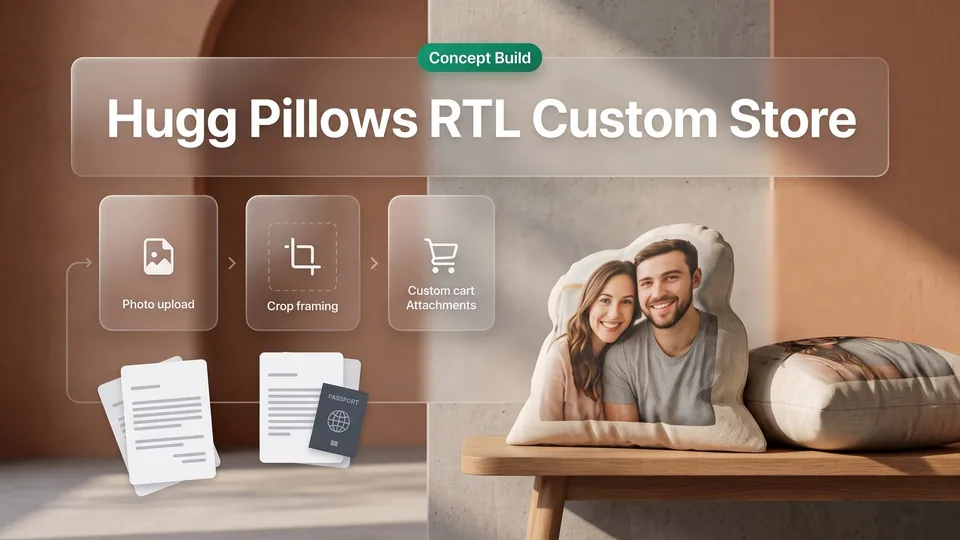
Custom merchandise storefronts require specialized architecture when personalization dictates production. For Hugg Pillows (client name changed under NDA), an Israeli brand turning personal photographs into custom-printed pillows, Canvas Developers engineered an end-to-end e-commerce experience featuring a tailored Shopify photo pillow designer. Built with native right-to-left Hebrew support and automated production file routing, the platform bridges digital personalization with manufacturing accuracy.
Project at a Glance: What Was the Hugg Pillows Engagement Scope?
Client Background (Name Changed Under NDA) and Israeli Market Context
Hugg Pillows (client name changed under NDA) is an Israeli brand creating custom-printed pillows from personal photographs. The store operates in Hebrew with pricing in Israeli New Shekels (ILS).
Core Scope: Custom RTL Shopify Storefront and Photo Personalization Workflow
The project centered on an rtl shopify storefront with photo personalization. Canvas Developers developed a custom shopify photo pillow designer where product pages direct shoppers directly into configuration.
Technical Stack: Shopify Liquid, Custom File Uploader, and ILS Currency Architecture
The architecture relies on Shopify Liquid templates, JavaScript upload handling, and ILS currency management, validating assets before cart handoff.
The Brief: What Are the Technical Challenges of an RTL Photo Gift Store?
Enforcing Photo Upload Validation Before Unlocking Product Variations
In custom gift commerce, photo personalization introduces strict production dependencies. Canvas Developers structured the product interface so shoppers cannot purchase personalized merchandise or select variations until an initial image is uploaded and validated.
Handling High-Resolution Smartphone Images Without Cart Abandonment
Modern smartphone uploads, particularly large iPhone images, frequently cause mobile checkout failures. The upload pipeline ensures large image files upload reliably, stay intact through session transitions, and remain attached to line items without browser crashes.
Maintaining Strict Right-to-Left (RTL) Layout Integrity Across Mobile Screens
An rtl shopify deployment demands consistent right-to-left alignment across every component. Form inputs, menus, and designer controls must flip completely to avoid broken alignments or awkward sideways scrolling on mobile devices.
Engineering Process: How Did Senior Engineers Direct AI-Accelerated Development?
Accelerating Frontend Scaffolding and Component Assembly with AI Coding Agents
Canvas Developers deployed AI coding agents to accelerate routine frontend scaffolding for the custom product upload designer. Automated tooling rapidly assembled repetitive UI modules, right-to-left layout containers, and base Liquid templates, substantially reducing initial development cycles.
Recognizing AI Limitations in Payment Flows, Custom File Handling, and Data Integrity
While AI coding excels at structured boilerplate, autonomous models struggle with mission-critical edge cases. Generative tools cannot independently safeguard checkout integrity, handle asynchronous file uploads across varying network speeds, or guarantee that custom attributes persist securely through payment webhooks.
Senior Engineering Oversight: Owning Core Architecture, Code Reviews, and Production Releases
To ensure system stability, experienced software engineers directed the build. Senior engineers architected the underlying shopify custom product designer, reviewed every line of code, audited state management, and made all release decisions prior to deployment.
What Was Built: How Does the Custom Shopify Pillow Designer Function?
On-Site Pillow Designer: Drag-and-Drop Upload with Progressive UI Unlocking
Product pages direct visitors into the custom on-site pillow designer under "create your pillow". Offering drag-and-drop and a file picker, the interface unlocks customization options only after an image is uploaded, ensuring photo personalization requirements are satisfied before ordering.
Automated Line-Item Property Attachment for Error-Free Factory Printing
Upon submission, the shopify photo pillow designer attaches the uploaded file as an "Upload Image" line-item property. Storing files directly in shopify line item properties guarantees production teams receive accurate artwork alongside order records.
RTL Homepage Funnel: Three-Step Guide, Customer Stories, and 72 Curated Product Cards
The right-to-left Hebrew storefront features structured navigation: Home, Create the pillow, Pillow ideas from customers, Order tracking, and Contact. The homepage showcases a three-step guide, customer stories, who pillows are for, best sellers, 72 product cards, working search, and 10% off first orders via newsletter.
Frictionless Cart Calculation and Guest Checkout in Israeli New Shekels (ILS)
The cart handles seasonal promo codes and transparent ILS pricing, confirmed at 338.00 ILS for two items. Shoppers reach checkout using a guest email field without encountering mandatory account registration.
QA & Store Verification: How Was Cross-Device Stability Confirmed?
Eight-Device QA Verification: Eliminating Horizontal Scrolling and Menu Defects
To confirm stability on the rtl shopify storefront, QA verified the live build across eight devices. Testing confirmed zero broken links or missing images, working menus, and seamless rotation without sideways scrolling.
Cart Math and Checkout Auditing for Multi-Item Orders and Promotional Codes
Auditing verified cart math in ILS, confirming 338.00 ILS for two items. Multi-item orders calculated accurately alongside seasonal promo codes, transitioning directly to guest checkout without friction.
ShopSentry Roadmap: Mobile Crop Optimization, Client-Side Image Compression, and Hebrew Alerts
Store audits via ShopSentry outlined improvements for the shopify custom product designer. Recommended enhancements include smoother mobile crop controls, client-side compression for large smartphone photos, and clear Hebrew notices for unsupported file formats.
Next Steps: How Can You Scope a Custom Shopify Product Personalizer?
Defining File Validation and Line-Item Requirements for Custom Merchandise
Developing a dependable shopify photo pillow designer requires clear technical boundaries early in scoping. Engineering teams must establish rigid file validation parameters, seamless line-item data pipelines, and responsive interface workflows before writing production code.
Starting with a Scoped Technical Assessment via Canvas Developers (https://www.canvasdevelopers.com/contact)
Whether creating a bespoke shopify custom product designer or modernizing an existing store, Canvas Developers begins every project with structured technical scoping followed by defined milestones, testing, and handover. Explore your custom e-commerce architecture by requesting a scoped assessment through the contact form at https://www.canvasdevelopers.com/contact.